
The account owner who didn't know
Picture a 90-person SaaS company. An account executive walks into a $140K renewal feeling good. The relationship is warm, the champion replies fast, the product gets used. Halfway through the call the buyer says, "Before we talk about next year — what's happening with the four tickets my team filed last month?" The AE has no idea what tickets. They were never copied. The summary they prepped from was the CRM activity log, which says nothing about a stalled SSO migration, two P2 bugs that bounced between tiers for three weeks, and an implementation hand-off that quietly went dark. The deal doesn't die in the room. It died in the support queue nobody on the account team had opened. That gap — between what support knows and what the person carrying the number knows — is the cheapest, highest-leverage thing a sales team can hand to AI first.
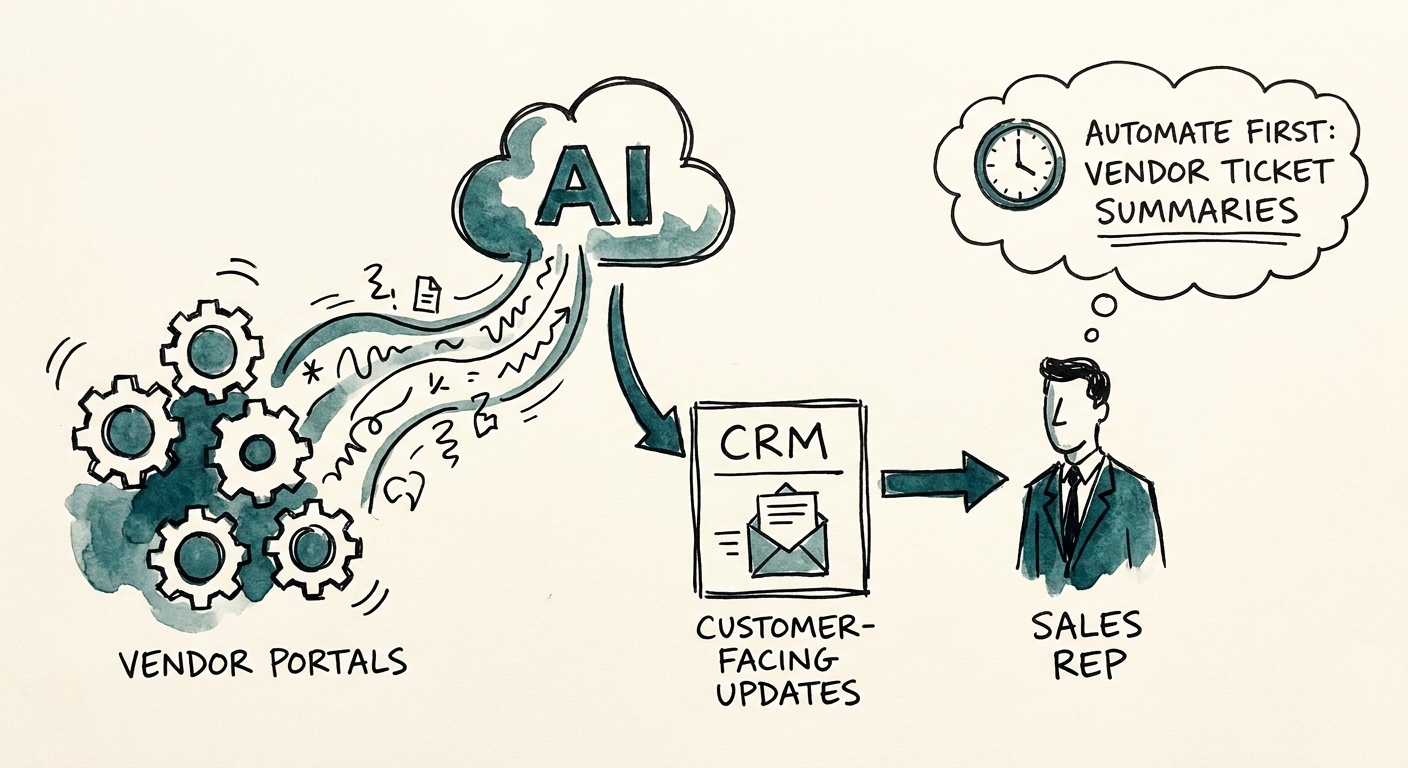
This is why vendor and support ticket summarization is a strong first candidate, and it has nothing to do with AI being trendy. The Salesforce State of Sales report and Salesforce State of Service report both describe the same fracture from two sides: revenue and service teams are sitting on the same customer, looking at different screens, and the buyer experiences the seam. A good first pilot doesn't try to write emails or score leads. It does one boring, defined job — pull the open issues for an account, with ticket age, who owns each one, the actual customer impact, and the single next safe action the account team should take — and put it where the AE looks before a renewal or expansion conversation.
The two failure modes that look like success
Here's what makes this use case sneaky. A summarizer can produce confident, well-formatted output that is quietly wrong in two specific ways, and both feel like wins in the demo. First: it invents risk. It reads a closed-three-months-ago ticket about a login hiccup and writes "customer experiencing ongoing authentication problems," and now your AE opens the renewal apologizing for a problem that was solved in February. Second, the opposite: it hides freshness. It blends a ticket filed yesterday with one from last quarter into a tidy paragraph that strips out the dates, so the AE can't tell what's on fire right now versus what's ancient history. Both versions read beautifully. Both are landmines.
So the metric that matters is not "did it generate a summary." Everything generates a summary. Run a weekly review on four numbers: how many summaries the account owner accepted without rewriting, how many stale-ticket corrections they had to make, how many CRM write-backs they actually approved, and how many renewal or expansion risks got escalated from support history that would otherwise have surfaced on the call. Set the baseline first — count the minutes an AE currently spends reconstructing an account's support history by hand before a QBR, and count how often they walk in not knowing. The Deloitte State of AI in the Enterprise 2026 read is that the teams getting value aren't the ones with the most AI surface area; they're the ones measuring whether the work actually changed. Only once those four numbers are owned by a named person should you reach for the AI Opportunity Score or the AI ROI Calculator to size the next move.
The write-back is where the danger is
The summary itself is low-risk. The moment it touches the CRM, or worse, becomes a customer-facing sentence, the risk changes shape. Two guardrails are non-negotiable. One: nothing gets written back to the account record without the owner clicking approve — a summarizer that auto-updates "renewal risk: high" because it misread a ticket can poison forecasting and trigger save-team motions on a healthy account. Two: a summary drafted from support tickets never leaves the building as a customer reply until a human has read it against the actual ticket state. The NIST AI Risk Management Framework gives you a clean way to write down the intended use, the failure modes, how you'll measure them, and who's accountable — do that on one page before you connect anything. And because this pilot reaches across the wall into the support and vendor ticketing system, the CISA AI data-security best practices should set the rules for which systems the tool can read, how customer data is handled, and what write-back logs you keep.
Start with one product line or one ticket type — say, just implementation tickets for renewals closing in the next 60 days. Wire it to read-only, route every summary through the account owner, flag any ticket older than your freshness window in red, and block customer-facing text entirely until a person signs off. Run it for one renewal cycle. If acceptance climbs and stale-ticket corrections fall, expand the scope — not before. Monday move: pull your next five renewals, open the support queue for each, and count how many open tickets your account team can't currently see. That number is your business case.